Summarizing: Dinamic pages with java script.
JAVA SCRIPT
Web developers mostly work with 3 languages, html, css, java script that represent the skiliton, skin, and mind of a web page respectively But how do you link the javascript to your html page? When you want to use JavaScript with a web page, you use the HTML script element to tell the browser it is coming across a script. Its s re attribute tells people where the JavaScript file is stored. But as a best practice you script javascript in a seperate file using your favorite text editor ex: VScode. and then linking it using the script tag providing the path in the src attribute.
DATA TYPES
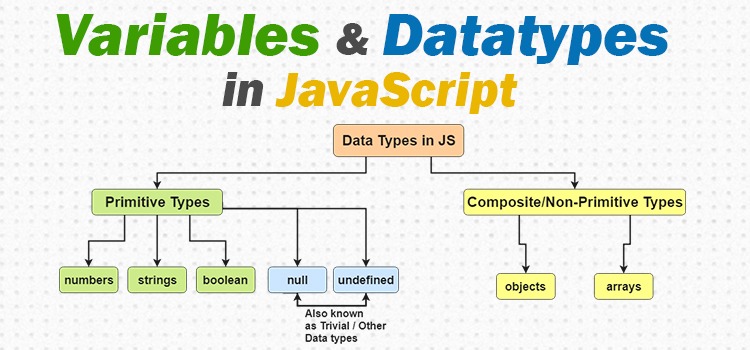
NUMERIC: any nymber.
STRINGS: any thing inside “” .
BOOLEAN: true and false.
WHAT IS A VARIABLE?
it’s holder of the value that might change to declare the variable.
#RULES FOR NAMING VARIABLES:
-
The name must begin with a letter, dollar sign ($),or an underscore (_). It must not start with a number
-
The name can contain letters, numbers, dollar sign ($), or an underscore (_). Note that you must not use a dash(-) or a period (.) in a variable name.
-
You cannot use keywords or reserved words.
-
All variables are case sensitive.
-
Use a name that describes the kind of information that the variable stores.
If your variable name is made up of more than one word, use a capital letter for the first letter of every word after the first word. For example, f i rstName rather than fi rstnarne (this is referred to as camel case
Like other objects that represent real-world things, the document object has:

- PROPERTIES: Properties describe characteristics of the current web page (such as the title of the page).
- METHODS: Methods perform tasks associated with the document currently loaded in the browser (such as getting information from a specified element or adding new content).
- EVENTS: You can respond to events, such as a user clicking or tapping on an element.